PDF table to Excel
Drop a single-page PDF with a table and get editable spreadsheet cells, even if the PDF is a scan.
How it works
- 1
Drop your file
A photo, screenshot or single-page PDF of a table.
- 2
Check the grid
The table is read in seconds. Click any cell to fix it.
- 3
Download
Get an .xlsx or .csv file, ready for Excel or Google Sheets.
See it work
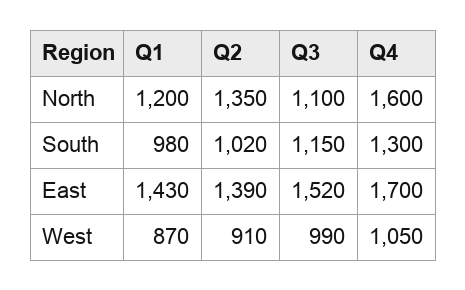
| Region | Q1 | Q2 | Q3 | Q4 |
| North | 1,200 | 1,350 | 1,100 | 1,600 |
| South | 980 | 1,020 | 1,150 | 1,300 |
| East | 1,430 | 1,390 | 1,520 | 1,700 |
| West | 870 | 910 | 990 | 1,050 |
Private by design
Your file is deleted after 1 hour. No account, no copies, no tracking of what is in your table.
Questions
Does it work on scanned PDFs?
Yes. The table is read from the page image, so scanned and text-based PDFs both work.
What about PDFs with many pages?
Only single-page PDFs are supported for now. Export the page that has your table, or take a screenshot of it, and drop that.
Is it really free?
Yes. You get 5 free conversions per day with no signup. If you need more, join the Pro list and we will tell you when higher limits are ready.
What happens to my file?
Your file is used only to read the table and is deleted automatically after 1 hour. We do not keep copies and we do not use your files for anything else.
Which files can I use?
PNG, JPG and WEBP images, or a single-page PDF, up to 10 MB. Multi-page PDFs are not supported yet.
Can I fix mistakes before downloading?
Yes. The result opens in an editable grid. Click any cell to correct it, then download as .xlsx or .csv.