Screenshot to Excel
Paste in a screenshot of a table from an app, a web page or a PDF viewer and get real spreadsheet cells.
How it works
- 1
Drop your file
A photo, screenshot or single-page PDF of a table.
- 2
Check the grid
The table is read in seconds. Click any cell to fix it.
- 3
Download
Get an .xlsx or .csv file, ready for Excel or Google Sheets.
See it work
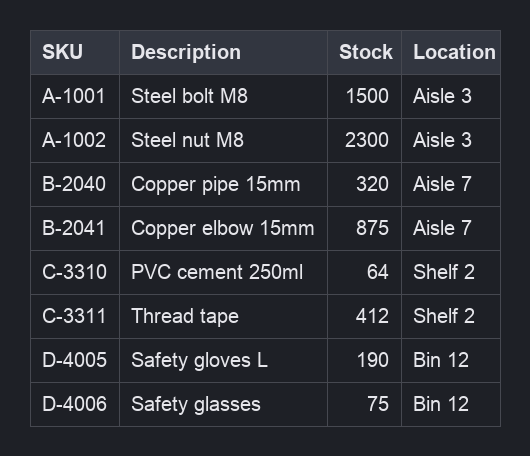
| SKU | Description | Stock | Location |
| A-1001 | Steel bolt M8 | 1500 | Aisle 3 |
| A-1002 | Steel nut M8 | 2300 | Aisle 3 |
| B-2040 | Copper pipe 15mm | 320 | Aisle 7 |
| B-2041 | Copper elbow 15mm | 875 | Aisle 7 |
| C-3310 | PVC cement 250ml | 64 | Shelf 2 |
| C-3311 | Thread tape | 412 | Shelf 2 |
| D-4005 | Safety gloves L | 190 | Bin 12 |
| D-4006 | Safety glasses | 75 | Bin 12 |
Private by design
Your file is deleted after 1 hour. No account, no copies, no tracking of what is in your table.
Questions
How do I convert a screenshot of a table to Excel?
Take the screenshot, drop the file in the box above, check the grid, and download the .xlsx. Dark mode screenshots work too.
Will it keep my numbers as numbers?
Yes. Values like 1,500 or 12.5 are saved as numeric cells so you can sum and sort them right away.
Doesn't Excel already do this?
Excel for Microsoft 365 has a built-in Data from Picture feature (Data > From Picture). If you have it, it is a good first thing to try. DropToTable is for when you do not: Excel 2019 or 2021, a work PC where it is missing or blocked, Google Sheets, or any other app. It also opens the result in an editable grid and works in the browser.
Is it really free?
Yes. You get 5 free conversions per day with no signup. If you need more, join the Pro list and we will tell you when higher limits are ready.
What happens to my file?
Your file is used only to read the table and is deleted automatically after 1 hour. We do not keep copies and we do not use your files for anything else.
Which files can I use?
PNG, JPG and WEBP images, or a single-page PDF, up to 10 MB. Multi-page PDFs are not supported yet.
Can I fix mistakes before downloading?
Yes. The result opens in an editable grid. Click any cell to correct it, then download as .xlsx or .csv.